

















The Ultimate Guide to The Scout Planner: How to Use the Month + Week Layout

OMG, hi! So you saw The Scout and thought, Wait...what is THAT? Welcome. You’re in the right place.
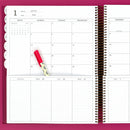
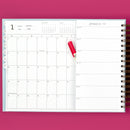
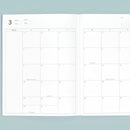
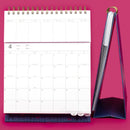
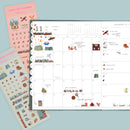
The Scout, formerly known as our Portrait Planner, is a Laurel Denise paper planner with our patented layout that lets you see your month and week at the same time.
It’s for those of us who want to see the big picture without losing all the everyday details. And once you understand how the layout works, it’s actually pretty simple.
I’ve never found a planner that worked for me, but being able to see the month and the week at the same time is just what I needed! - Jessica H.
How Does The Scout Month + Week Layout Work?
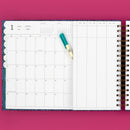
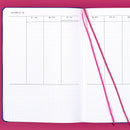
Your monthly calendar stays visible at the top while you flip through the short weekly pages underneath. The days line up vertically, so Monday is under Monday, Tuesday is under Tuesday, Wednesday is under Wednesday, all the way across.
So if Saturday says “Soccer Tournament” in your month, look straight down. Saturday’s weekly space can hold “wash uniform,” “pack snacks,” and “bring chairs.”
The month shows you what’s happening. The week gives all the details somewhere to go.
That’s the magic of Scout: you can see how it all fits together without flipping back and forth between your month and week.

You Might Be a Scout Person If...
...you want to see your month and week at the same time because once you flip the page, whatever was on the other side might as well have disappeared.
...you like structure, but you also like being the one who decides what the structure is.
...Monday needs a schedule, Tuesday needs a to-do list, and Saturday needs three reminders and a dinner plan.
...your calendar has the appointments, your notes have the details, your to-do list has the tasks, and your brain would really appreciate it if they could all please talk to each other.
...you’re less interested in having more planning space and more interested in being able to see how everything fits together.
Basically, if your brain has ever said, “Can I please just see all the things?” Scout was made for that.
How to Use The Laurel Denise Scout Planner
First things first: there is no single right way to use The Scout.
We’re going to show you the rectangle. You get to turn it into a circle, diamond, star, or whatever planner shape makes sense to your brain.

1. Start with what’s happening this month
Put the plans that already have a date in your monthly calendar: appointments, birthdays, meetings, school events, practices, travel, deadlines, dinner with your sister.
This gives you the big picture before you start filling in the details.
And if you’re a devoted Google Calendar person, hi, we see you. Scout doesn’t have to replace your digital calendar.
You can use it to pull the important pieces out of your digital world and put them somewhere you can see them together.
2. Add the details to your week
Now look underneath your monthly calendar.
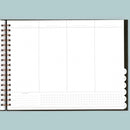
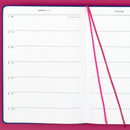
Your lined vertical columns give the everyday stuff somewhere to go: tasks, meals, errands, reminders, preparation, appointments, or whatever else you need to remember.
If Tuesday has a doctor’s appointment in the month, Tuesday underneath might say:
- Write down questions to ask
- Bring insurance card
- Complete the pre-appointment forms
If Friday says “Friends coming for dinner,” your weekly space might hold your grocery list and the reminder to please remove the pile of mail from the dining room table.
Big picture above. Details below.
3. Look up and down, not back and forth
This is the part that makes Scout feel different.
Find something in your monthly calendar and move your eye straight down to that day in your week.
No flipping back to the month. No trying to remember what you just saw. No mentally reconstructing your schedule from several different pages.
Your plans stay connected because you can see them together.
4. Make the weekly columns work for your brain
This is where you get to make Scout yours.
Use the lined daily columns for to-do lists. Time block your day. Divide them into work and home. Add meals, workouts, assignments, errands, kid stuff, or reminders.
And if Monday needs a detailed schedule while Saturday needs three little to-dos and a dinner plan? Great.
You can change how you use the space depending on what your week actually looks like.
Scout Planner Layout Ideas and Examples
This is usually the part where Scout really starts to make sense.
Because we can tell you the layout is flexible all day long, but sometimes you just need to see what another person did with it and think, Ohhhhh. Okay. I could do that.
Work + Home
 Put meetings, appointments, deadlines, and bigger events in the month. Then use your weekly columns for priorities, follow-ups, errands, household tasks, and everything that needs to happen around them.
This can be especially useful if your work calendar is digital but you want one paper view where work and life can exist together.
Family Schedule + Meals

Use the month for practices, appointments, school events, birthdays, and family plans.
Underneath, your weekly space can hold meals, groceries, kid tasks, household to-dos, and all the little things you need to do before those bigger plans happen.
Time Blocking + To-Do Lists

Scout’s lined vertical columns give you room to time block, make a daily list, or mix the two depending on what your day looks like. Our time washi fits the lined columns if you want a little more visual structure.
School + Student Life

Put exams, assignments, school events, meetings, practices, and days off in the month.
Then use the weekly columns for assignments, study tasks, class schedules, prep work, or daily reminders. Notes spaces can hold meeting notes, project details, or whatever else you need to keep close.
Want to See The Scout in Action?
We thought you might.
Laurel and Nancy walk through the entire Scout layout in our video guide, including who it works well for, different ways to use the pages, extra planning spaces, accessories, and several filled-in Scout examples.
If you’re looking at the layout thinking, Okay, I understand it, but what would I actually write where? this is a very good place to go next.
What Else Is Inside The Scout?
The month-and-week view may be the star of the show, but Scout also gives all the stuff that doesn’t belong on your calendar somewhere to live.
Each monthly section includes dot grid notes space and a habit tracker for running lists, reminders, notes, routines, or whatever you’d otherwise be tempted to start another notebook for.
You’ll also find pages for yearly planning, looking ahead, checklists, graph and dot grid notes, yearly wins and lessons, and reflecting on your year.
There are tabbed monthly pages to help you get where you’re going quickly, pocket folders for loose papers, and two clear acrylic bookmarks to help you keep your place.
Do you have to use every single one of these spaces? Absolutely not.
They’re there when you need them. That’s the point.
Choose Your Scout
Once you know Scout is your layout, you’ve still got a few choices to make.
Depending on the collection, The Scout is available in Yearly Dated, Academic, and Undated options, so you can choose the calendar that makes the most sense for when you want to start planning.
You can also choose between Large and Small sizes, plus spiral or discbound binding options.
Same Scout layout. Just a few different ways to make her yours.
You don’t have to figure out your perfect Scout setup before you start. Set up one month, use it, and pay attention to what works. Maybe meals end up in your month. Maybe you time block Mondays and make lists on Saturdays. Good. Your first month isn’t the final exam. It’s information for your second month.
Is The Scout Planner Right for You?
If the thought running through your head is “I just want to see everything together,” Scout is probably worth a closer look.
But Scout isn’t the right planner for everybody, and we actually think that’s helpful to know.
If you want super-detailed hour-by-hour time blocking with lots of writing space, take a look at The Anne.
If you prefer dividing your day into larger sections or want more horizontal writing space, The Nancy may make more sense.
If you love the idea of seeing your plans together but want significantly more notes right in front of you, The Luna might be your girl.
Different planning behavior, different layout.
The goal isn’t to pick the planner everybody else loves. It’s to find the one that helps you see your life more clearly.
Still Deciding Which Planner Is Right for You?
Scout might be calling your name, but she’s not your only option.
Compare Our Planner Layouts
See our planner layouts side by side and find the one that fits the way you naturally plan.
Take the Planner Quiz
Answer a few questions about how you plan, and we’ll help point you toward your best fit.
Scout Planner FAQs
How do you use The Scout Planner?
Start by putting dated events, appointments, deadlines, and bigger plans in the monthly calendar. Then use the weekly pages underneath for tasks, reminders, meals, time blocks, and everyday details connected to those plans.
There isn’t one required Scout setup. The vertical weekly columns are designed to flex with the way you plan.
Can you see your month and week at the same time in The Scout?
Yes. That’s the whole idea!
The Scout uses our patented layout to keep your monthly calendar visible at the top while you turn through the weekly pages underneath. The days also align vertically, so you can look straight down from a date in your month to that same day in your week.
Can you time block in The Scout Planner?
Yep. Scout has lined vertical daily columns that can be used for time blocking, lists, or a combination of both. Our time washi also fits the lined columns if you want to add more structure.
If detailed hour-by-hour scheduling is the main way you plan and you need lots of writing room, The Anne may be a better fit.
Is The Scout a vertical weekly planner?
Yes. The Scout has lined vertical daily columns on the short weekly pages underneath the monthly calendar.
What makes Scout different is how those weekly pages work with the month above them. The days align vertically, so you can look straight down from a date in your monthly calendar to that same day in your week.
Is The Scout the same as the Laurel Denise Portrait Planner?
Yes! If you’ve been searching for the Laurel Denise Portrait Planner, you found her.
The Scout was formerly called our Portrait Planner, so you may still see that name in older Laurel Denise videos, posts, and planner conversations.
Ready to Take a Closer Look at The Scout?
If seeing your month above your week just made something click in your brain, come take a closer look.
Explore the sizes, covers, and current Scout options and see if one feels like yours.
Because Planner Peace doesn’t have to mean having the most elaborate system.
Sometimes it’s opening your planner, seeing the month above the week, and realizing you don’t have to piece everything together anymore.

