













The Luna Planner: A Deep Dive Into the Layout

If you like seeing your month and week at the same time but keep wishing you had more room for notes, lists, and all the things that don't belong on a particular day, The Luna might be your layout.
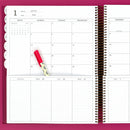
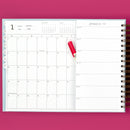
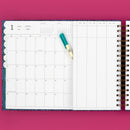
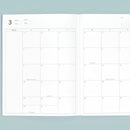
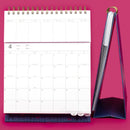
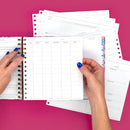
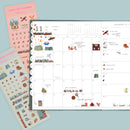
The Luna Planner keeps your monthly calendar and a large dot grid notes page visible while you flip through the short pages below. Each month starts with habit tracking, categorized lists, and dot grid space, followed by the weekly planning pages for that month.
So you can see what's happening, plan what you're doing this week, and keep everything else you need nearby.
But the best way to know if Luna will work for you is to see how that space actually works.
How does The Luna Planner layout work?
The Luna is designed around one pretty simple idea: some things need a date, some things need your attention this week, and some things just need somewhere to live.
Your monthly calendar and full dot grid notes page stay visible throughout the month. Below them are shorter pages that you flip as the month goes on.
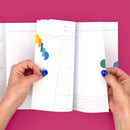
At the beginning of each month, those short pages include a habit tracker and four categorized list spaces on the left, with additional dot grid space on the right. After that, you'll flip through a short planning page for each week of the month.

That means you don't have to flip back to your monthly calendar every time you're working in your week. And you don't have to leave your notes behind when you move to next week.
The things you want to keep in sight can stay in sight.
Luna tends to work well for people who want enough structure to know what's happening and what they need to do, but also need flexible space for everything that doesn't fit neatly into a calendar.
You might especially like The Luna if you:
- Want to see your month while you're planning your week
- Keep running lists or notes near your schedule
- Need somewhere for meeting notes, project information, meal ideas, or brain dumps
- Like having open space you can use differently from month to month
- Use sticky notes because you want some information to stay movable
- Prefer deciding what a space is for rather than having every section of your planner decide for you
One Luna customer described that feeling especially well:
“The Luna Planner feels designed just for my brain! Before discovering Laurel Denise, I was creating makeshift versions of all this planner offers: the ability to see the month and the week at the same time, with ample space for notes.”
If you've been trying to create your own version of that system with extra notebooks, margins, loose lists, or sticky notes, Luna may give all of those pieces a more natural place to live.
How do you actually use The Luna Planner?
There isn't one correct way to use Luna. But if you're trying to decide whether the layout will work for you, it can help to think about the different jobs each part can do.
Use your monthly calendar for what's happening
Appointments. Birthdays. Travel. School events. Practices. Meetings. Deadlines. Days off.
The monthly calendar gives you the big picture, so this is a natural home for anything you want to see when you're looking at the month as a whole.
It doesn't have to carry every detail. In fact, Luna works especially well when you let the other parts of the layout do some of that work.

Use your weekly pages for what you're doing
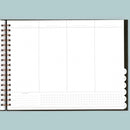
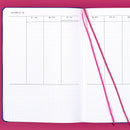
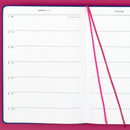
The short weekly pages give you a lined column for each day plus a This Week column.
You can use the daily columns for appointments, tasks, meals, workouts, priorities, reminders, or whatever you need to get through that particular day.
And you don't have to use those columns the same way we do.
In one Luna setup, the daily columns are divided into workouts, top priorities, and meals. In another, they're simply running task lists. You can also add washi if you want to create sections or light time blocking.
The question isn't really, “What am I supposed to put here?”
It's, “What would be helpful for me to see each day?”

Use your categorized lists for things that belong together
Each month starts with four categorized list spaces.
These work well for things you want to keep together without assigning them to a particular day.
Errands. Calls to make. Things to buy. Work priorities. Books to read. Family reminders. Projects you're keeping an eye on.
And those categories can change next month.
If you start January convinced one section will be for errands and discover by February that you never write errands there, you have learned something useful. Give the space another job.

Use your dot grid notes page for everything you want nearby
This is the part of Luna that often makes the decision for someone.
The full dot grid notes page stays visible next to your monthly calendar while you move through your weekly pages.
We've seen people use it for meeting notes, project planning, task backlogs, meal ideas, wellness tracking, homeschooling, monthly goals, family information, travel planning, recurring reminders, brain dumps, and sticky notes.
One Luna customer had already been creating that kind of space herself:
“I was often plastering sticky notes over the right side of the calendar and would miss the special recognition dates. Now I can plaster away and still see birthdates and workiversaries for my staff!!”
If that sounds familiar, pay attention to it.
You may not need more room in your calendar. You may need room beside it.

What can you put on The Luna notes page?
If you looked at that big dot grid page and immediately thought of five things you could do with it, you're probably all set.
If a big blank dot grid page makes you think, Okay, but what am I supposed to put there?, start with what you already need somewhere else.
Your Luna notes space could become a meal-planning spot one month, project headquarters the next, or simply a place to get everything out of your head. Here are five ideas to get you started.

You don't have to choose one job for the whole year, either. That's part of what makes the open space useful. It can change when your life does.
“This layout is perfect for an overview, notes from meetings and daily to dos. I love the right side being blank so when I take notes if I need to refer back to them, I know exactly where to find them!”
See The Luna Planner in action
Sometimes the fastest way to know whether a planner will work for you is to watch someone actually use it.
In our Ultimate Guide to The Luna Planner, Laurel and Nancy walk through the layout, sizes, features, accessories, and several very different real-life setups. You'll see Luna used for work, wellness, meal planning, time blocking, task management, travel, and more.
Can you use The Luna Planner for work and personal planning together?
Yes. Luna can work particularly well if your work and personal schedules need to stay connected but the information surrounding them is very different.
Your monthly calendar might hold meetings, appointments, birthdays, school events, travel, and practices.
Your weekly pages might hold the things you actually need to do.
And the notes page can hold the context around those plans: meeting notes, project details, follow-ups, ideas, data, or whatever you need to reference as the month goes on.
One special education teacher told us:
“I can see my entire month AND my week at the same time without a big bulky desk calendar. The intentional set up feels very personalized, with note pages and trackers I can use for data. It's the perfect way for me to combine my personal and professional schedules.”
The useful question here isn't whether Luna is a “work planner” or a “personal planner.”
It's whether keeping those parts of your life visible together would make planning easier for you.
What's the difference between The Luna and The Scout?
If you're deciding between The Luna and The Scout, this is probably the most important comparison to understand.
Both layouts let you keep your monthly calendar visible while you move through your weekly planning pages.
The difference is what they prioritize.
The Scout gives you more room in your monthly calendar. Its calendar stretches across the planner, giving you larger monthly boxes, and the weekly columns below line up with the corresponding days in the month.
The Luna gives you more room beside your monthly calendar. The calendar stays on one side so the other can become a full dot grid notes page that remains visible throughout the month.
So ask yourself:
Would I rather have more room in my month or more room beside it?
If you like writing quite a bit directly inside your monthly calendar boxes, Scout may make more sense.
If you'd rather have a separate, flexible space for lists, notes, projects, brain dumps, and everything else you want nearby, Luna may make more sense.
A customer who moved from Scout to Luna described the tradeoff perfectly:
“I’m missing having more space to write on the calendar boxes but am thoroughly enjoying the brain dumping space.”
That's the tradeoff.
Neither layout is the “better” version of the other. They're designed for different ways of using the space.

Can you time block in The Luna Planner?
Yes, if you like light or flexible time blocking.
Luna's lined daily columns can be divided with washi or used with Condensed Time Washi when you want more structure. You'll see an example of that in our Luna walkthrough.
If detailed time blocking is one of the main things you want from your planner, though, we'd compare Luna with some of our more structured weekly layouts before deciding.
The Anne gives you more space for time blocking. The Kristy puts more emphasis on your weekly view, although you won't see the month and week simultaneously in the same way you do with Luna.
Explore The Anne Planner | Explore The Kristy Planner
Can you add inserts and accessories to The Luna Planner?
Yes!
And Luna has a particularly handy setup for inserts because you can add a full-page paper or plastic insert without covering your monthly calendar.
That means you can add another layer to your planning system while keeping the big picture visible. In the Luna walkthrough, for example, you'll see a plastic insert used as a reusable meal bank.
You don't need to add accessories just because there's room for them. Start with what you need the accessory to do.
Sticky notes are useful when you want information to move. A plastic insert can hold something you reference repeatedly. A paper insert can give one particular area of life dedicated planning space.
For compatible Laurel Denise inserts and accessories, choose Size 1 for a large Luna and Size 4 for a small Luna.
Shop Luna Large Accessories | Shop Luna Small Accessories
Is The Luna Planner right for you?
If you're still deciding, come back to how you naturally want information to live on the page.
Luna may be a good fit if you:
- Want your monthly calendar visible while you plan your week
- Need substantial writing space outside your calendar
- Keep running lists, notes, projects, or brain dumps near your schedule
- Like having open space you can use differently from month to month
- Want some structure without having every section tell you exactly how to use it
- Like moving information between a bigger monthly picture and the week in front of you
You may want to compare another Laurel Denise layout if:
- Larger monthly calendar boxes are more important to you than dedicated notes space
- You want your weekly days to line up directly beneath the corresponding dates on your monthly calendar
- Detailed time blocking is the main way you plan
- A large open notes page sounds more intimidating than useful
You don't have to imagine yourself using every feature perfectly.
You're really trying to answer one question:
When I look at this layout, does the information I need have somewhere that makes sense to me?
If the answer is yes, there's a good chance Luna will feel pretty natural once you start using it.
Still comparing layouts? Take the Planner Quiz and we'll help you narrow down which Laurel Denise planner fits the way you naturally plan.

